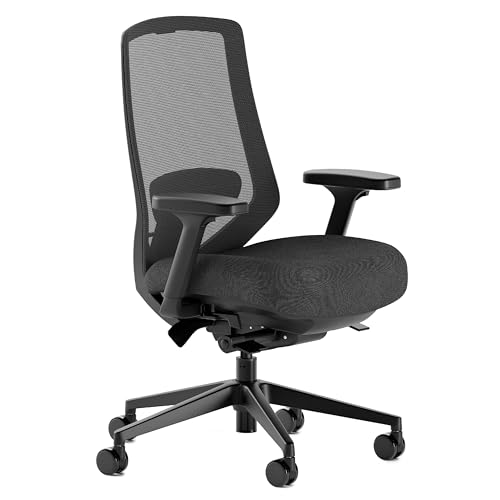
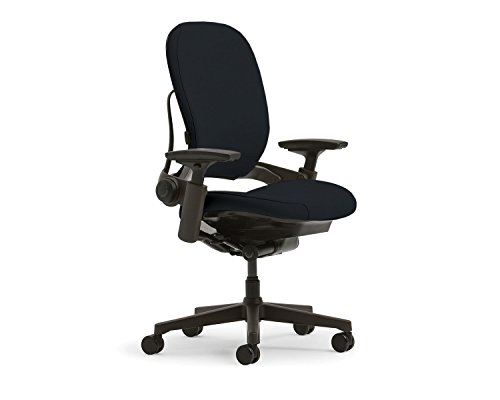
Ergonomic Chair Comparison (Overview)
Match your budget and support needs first — then use the picks below to choose the best ergonomic chair for your workspace.
| Ergonomic Chair | Best For | Seat Material | Weight Capacity | Warranty | Price Range |
| Herman Miller Aeron | Best overall ergonomics | Mesh | Up to 350 lbs | 12 Years | $$$$ |
| Branch Ergonomic Chair | Best value | Foam | Up to 275 lbs | 2 Years | $$ |
| HON Ignition 2.0 | Best budget | Foam/Mesh | Up to 300 lbs | Limited Lifetime | $ |
| Steelcase Leap V2 | Long hours | Fabric | Up to 400 lbs | 12 Years | $$$$ |
| Humanscale Freedom | Best lumbar support | Mesh | Up to 300 lbs | 15 Years | $$$$ |
| Autonomous ErgoChair Pro | Best looking | Mesh | Up to 300 lbs | 2 Years | $$ |
Product selections are based on manufacturer specifications, ergonomic suitability, and common home and professional office requirements.
How to Choose the Right Ergonomic Chair
1. Start With Lumbar Support The single most important feature in an ergonomic chair is how it supports your lower back. Look for adjustable lumbar support that lets you position the firmness and height to match your spine’s natural curve. Fixed lumbar support is better than none, but adjustable is the standard on any chair worth buying.
2. Match the Chair to Your Sitting Hours Not all ergonomic chairs are built for the same workload. If you sit 4 hours or less, a mid-range chair like the Branch or HON will serve you well. If you’re at your desk 6–8+ hours daily, invest in a Steelcase Leap V2 or Herman Miller Aeron — the difference in support over long sessions is significant.
3. Mesh vs. Foam Seat Mesh backs promote airflow and are better for warm environments or long sessions. Foam seats tend to feel more plush initially but can compress over time. The best setups pair a mesh back with a well-cushioned foam seat — which is exactly what the HON Ignition 2.0 and Branch do.
4. Adjustability Points Matter At minimum, a quality ergonomic chair should offer: seat height, lumbar support, armrest height, and recline tension. Premium chairs like the Aeron and Leap V2 add seat depth, tilt limiter, and forward tilt — giving you far more control over your sitting position throughout the day.
5. Warranty as a Quality Signal Herman Miller and Steelcase both offer 12-year warranties — the industry benchmark for premium seating. Humanscale goes further at 15 years. Anything under 2 years on a chair in this price range warrants scrutiny before you buy.
FAQs
Are expensive Ergonomic Chairs Worth It?
For occasional use, no — a mid-range chair is perfectly adequate. But if you sit 6+ hours a day, the investment in a premium chair pays off in reduced back pain, better posture, and a chair that lasts a decade or more. The Herman Miller Aeron and Steelcase Leap V2 are still in daily use in offices 15 years after purchase.
What is the best Ergonomic chair for back pain?
The Steelcase Leap V2 is most consistently recommended by ergonomics specialists for back pain specifically, due to its LiveBack system that adapts to your spine’s movement. The Herman Miller Aeron is a close second. For budget-conscious buyers, the HON Ignition 2.0 offers solid lumbar support at a fraction of the price.
How long should a good ergonomic chair last?
A quality ergonomic chair from a reputable brand should last 10–15 years with normal use. Herman Miller and Steelcase back this up with 12-year warranties. Budget chairs typically last 3–5 years before the foam compresses and mechanisms loosen. Single-motor desks use one motor to drive both legs, which can create uneven lift and more wobble under heavier loads. Dual-motor desks have a dedicated motor per leg, resulting in smoother, more stable height transitions — especially important for multi-monitor setups.